Browse
Filter the catalogue by output — decks, pages, images or video — or ask your agent to find the Skill for the job.
Install
One prompt. Your agent reads SKILL.md and sets up the client; free Skills need no card, only a free NeoSpark account to download.
Run it
Ask for the deck, page, image or film. The Skill supplies the format, pacing and art direction.
A marketplace for creative Agent Skills
The creative Agent Skills marketplace. Every agent can use it. Publish once. Every agent runs it.
NeoSpark is a creative Agent Skills marketplace where creators publish reusable SKILL.md packages and anyone can install them into Claude Code, Codex, Cursor and 12 more AI agents to produce decks, web pages, images and video.
A Skill is a reusable SKILL.md folder your agent installs from a single prompt. Hand one to Claude Code, Codex, Cursor or Grok Bot and it ships the deck, the page, the image or the film on the next ask.
7 of 7 Skills are free. No card — a free NeoSpark account is all you need.
You can also run any Skill in the NeoSpark chat app — no agent to connect.
Installs into 15 AI agents, including
Grok Bot, Meta Muse and the rest of this new wave of assistant-side bots read the same SKILL.md folder — no plugin port, no separate build.
 Claude Code
 Codex
 Cursor
 Hermes
 Grok
 OpenCode
 OpenClaw
- +8 more
Agent Skills
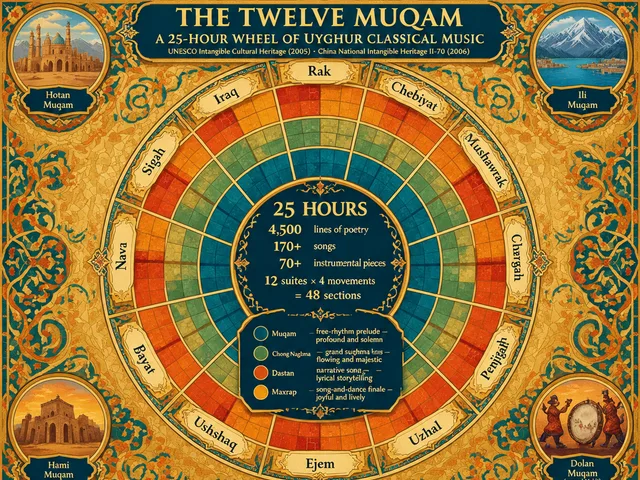
FeaturedFree
Image · Design & Media
Infographic Designer
Turn articles, notes, data or pasted text into a polished infographic plate.
Free

FeaturedFree
Image · Marketing & Growth
E-commerce Detail Page Expert
Generate a high-end 3x3 visual strategy for product detail pages — nine hero-image prompts plus NeoSpark preview renders.
Free
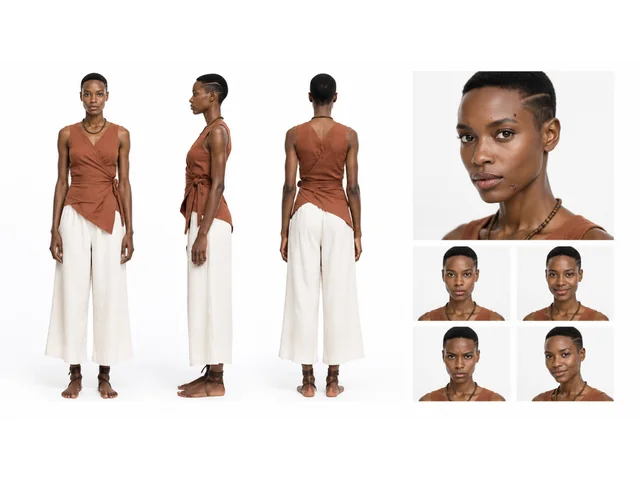
FeaturedFree
Image · Design & Media
NeoSpark Image Gen
Generate, edit and fuse images through the NeoSpark API — text-to-image, image-to-image and multi-reference.
Free

FeaturedFree
Video · Marketing & Growth
NeoSpark Video
Generate and manage NeoSpark video tasks — text-to-video, image-to-video and watermark removal.
Free

Free
Image · Design & Media
Drawing Prompt Optimizer
Turn a rough idea into a polished, high-quality prompt ready for any AI drawing model.
Free
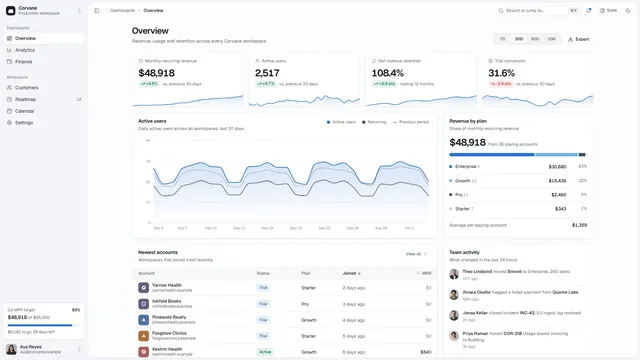
Free
Web · Developer Tools
Agent Reach
Read and search the public web from any agent — fetch pages as Markdown, read RSS feeds, and query GitHub, YouTube, X and more.
Free

NewFree
Image · Design & Media
Grid Systems & Editorial
Plan print and screen grid systems — margins, baseline, columns and type scale — and render Swiss editorial or neo-brutalist mockups.
Free
FeaturedFree
Image · Design & Media
Infographic Designer
Turn articles, notes, data or pasted text into a polished infographic plate.
Free
FeaturedFree
Image · Marketing & Growth
E-commerce Detail Page Expert
Generate a high-end 3x3 visual strategy for product detail pages — nine hero-image prompts plus NeoSpark preview renders.
Free
FeaturedFree
Image · Design & Media
NeoSpark Image Gen
Generate, edit and fuse images through the NeoSpark API — text-to-image, image-to-image and multi-reference.
Free
FeaturedFree
Video · Marketing & Growth
NeoSpark Video
Generate and manage NeoSpark video tasks — text-to-video, image-to-video and watermark removal.
Free
Free
Image · Design & Media
Drawing Prompt Optimizer
Turn a rough idea into a polished, high-quality prompt ready for any AI drawing model.
Free
Free
Web · Developer Tools
Agent Reach
Read and search the public web from any agent — fetch pages as Markdown, read RSS feeds, and query GitHub, YouTube, X and more.
Free
NewFree
Image · Design & Media
Grid Systems & Editorial
Plan print and screen grid systems — margins, baseline, columns and type scale — and render Swiss editorial or neo-brutalist mockups.
Free
Use with ChatGPT, OpenClaw, Claude, Cursor, Hermes or Grok — or in NeoSpark, on your platform.
A capable model is not the same as a finished deliverable. Three things still go wrong after the prompt.
Nothing compounds
Every task starts from an empty thread. The prompt that worked last week is not saved, versioned or reusable next month.
Generic prompts, generic output
Ask for a deck and you get a deck-shaped answer: no art direction, no layout system, and no example of what good looks like.
Workflows do not travel
A setup built for one agent rarely survives the move to another editor, model or teammate.
The Skill layer
A Skill packages the finished result — and the instructions that remake it
NeoSpark is the marketplace where those packages live. A Skill is a folder your agent installs: a SKILL.md it can follow, the templates and scripts the work needs, and a real example of what it produces. One install works across every compatible agent.
Browse free Skills7 Agent Skills, ready to install
Every one starts as a finished piece of work — a real deck, page, image or film — with the instructions, templates and scripts that let your agent make it again.
Browse by outcome, not by vendor
Filter on what you need to end up with — slides, a page, an image, a film — rather than on which model happens to be behind it.
- See the result before you install. Every card shows work the Skill actually produced — no mockups.
- One prompt, in the agent you already use. Skills are plain SKILL.md folders your agent installs and verifies.
- Free to install, no card. All 7 Skills cost nothing; a NeoSpark account opens them, and a paid plan adds credits when you need more runs.
Output
- Slides0 Skills
- Web1 Skills
- Image5 Skills
- Video1 Skills
- Free to install7 Skills
FeaturedFree
Image · Design & Media
Infographic Designer
Turn articles, notes, data or pasted text into a polished infographic plate.
Free
FeaturedFree
Image · Marketing & Growth
E-commerce Detail Page Expert
Generate a high-end 3x3 visual strategy for product detail pages — nine hero-image prompts plus NeoSpark preview renders.
Free
FeaturedFree
Image · Design & Media
NeoSpark Image Gen
Generate, edit and fuse images through the NeoSpark API — text-to-image, image-to-image and multi-reference.
Free
FeaturedFree
Video · Marketing & Growth
NeoSpark Video
Generate and manage NeoSpark video tasks — text-to-video, image-to-video and watermark removal.
Free
Free
Image · Design & Media
Drawing Prompt Optimizer
Turn a rough idea into a polished, high-quality prompt ready for any AI drawing model.
Free
Free
Web · Developer Tools
Agent Reach
Read and search the public web from any agent — fetch pages as Markdown, read RSS feeds, and query GitHub, YouTube, X and more.
Free
7
Skills in the catalogue
15
AI agents they install into
7
Free to install
—
Installs across the catalogue
Catalogue counts, ratings and install figures come from the live NeoSpark catalogue.
Two sides. One marketplace.
Author
A folder with a SKILL.md, a manifest and a declared output. No plugin API to port to, no per-editor build.
Publish
Upload the folder or let your agent publish it. Review checks the manifest, the preview and every network call.
Reach
One listing installs into all 15 agents on this page, from Claude Code and Codex to Cursor and Grok.
What installing a Skill changes
Every feature below maps to a job you no longer do by hand — and to a decision you no longer make from scratch.
| Feature | What it does for you |
|---|---|
| Install prompt | One paste sends your agent to /install/agent.md, which walks you through sign-in, download and install. Prefer to wire it up yourself? Download the bundle instead. |
| SKILL.md workflow | Your agent follows a tested process instead of improvising from the prompt. |
| Declared output | Slides, web, image or video — the format is decided before the work starts. |
| Real previews | Every Skill page shows work the Skill actually produced, not a mockup. |
| Cross-agent packaging | The same SKILL.md installs into all 15 agents; there is no per-editor build. |
| In-house maintenance | One team updates the templates, scripts and instructions as models change. |
Start with a free Agent Skill
No card. Paste one prompt, or run a Skill in the chat app with a free account.
For publishers
Publish an Agent Skill, reach every agent
A Skill is a folder with a SKILL.md in it. Publish it once and it installs into all 15 agents on this page — there is no plugin API to port to and no per-editor build.
See how installs workWhat review covers
- A manifest that validates, with a version and a declared output
- A SKILL.md your agent can follow without you in the room
- Previews rendered from work the Skill actually produced
- No secrets, and no network call the manifest doesn't declare
- 01
Web upload
Drop a folder or a .zip into the browser. We validate the manifest, render the preview and publish it under your namespace.
- 02
Agent publish
Point your agent at the repository and ask it to publish. It writes the manifest from the Skill you already have and opens the listing for review.
- 03
Scripted upload
Send the same .md or .zip to the upload endpoint your browser form uses, authenticated as your account. Same validation, same review queue.
Uploads go to a real review queue. The upload form on the publish page submits the package for manual review; every Skill in the catalogue today was authored in-house. Star counts and install figures hydrate from the live NeoSpark catalogue.
Install Agent Skills — or run one in the chat app
Give your AI agent practical, reusable workflows for real tasks. Paste one prompt and your agent connects and installs the Skill — or download the bundle and point Claude Code or Codex at it. No agent yet? Run any Skill in the NeoSpark chat app.
- 01
Discover a Skill
Browse the catalogue by output, or ask your agent to find one for the job in front of you.
- 02
Sign in and download
Signing in opens the Skill page; Download returns the skill, an installer and a single-Skill nsk_ key.
- 03
Install and verify
Your agent installs the Skill, reads SKILL.md and confirms it works before you ask for anything.
Ask your agent to install it
Read https://useneospark.com/install/agent.md and follow the instructions to connect NeoSpark, then help me discover the right Skill.Any agent that reads SKILL.md
Every Agent Skill is designed in-house
Each one starts as a finished piece of work we design ourselves: a deck, a page, a film. Then we write the instructions, templates and scripts that let your agent make it again.
- 01
Design the result
We art-direct the finished output first: layout, type, color and motion.
- 02
Write the workflow
Original instructions, templates and scripts, packaged as one SKILL.md.
- 03
Run it for real
Each Skill page shows a real result it made.
- 04
Keep it current
The same team updates each Skill as agents and models change.
Start free. Upgrade when you need more credits.
Every plan runs the same catalogue; paid plans add monthly credits for runs — billed monthly or yearly through Stripe.
Starter
Perfect for beginners
$18/ month
- 2,000 credits every month
- All Skills, on every plan
- Standard image quality
Best value
Growth
Best value for creators
$31/ month
- 3,500 credits every month
- Higher resolution renders
- Priority queue
Pro
For professional creators
$68/ month
- 11,000 credits every month
- 4K renders
- Video Skills included
Ultimate
For teams & studios
$148/ month
- 27,000 credits every month
- Fastest queue
- Early access to new Skills
Secure checkout by Stripe. Credits refresh every month.
Free accounts include 200 credits a month. Prices in USD; cancel anytime.
Installs into 15 AI agents
Claude Code Claude DesktopCodex
 ChatGPTCursor
 GitHub Copilot
 Gemini CLI
 Antigravity
 Windsurf
 Cline
 Kilo CodeGrokHermesOpenCodeOpenClaw
How NeoSpark compares
| Platform | Works in any agent | Runs online | Real previews | Reviewed listings | Agents |
|---|---|---|---|---|---|
| NeoSparkThis site | Yes | Yes | Yes | Yes | 15 |
| Copy-paste prompt libraries | No | No | No | No | — |
| Editor plugin marketplaces | No | No | Yes | No | 1 |
Scroll sideways for every capability →
See the full comparisonNeoSpark vs prompt libraries and editor plugins
All three can produce a deck. They differ in what happens when you need the same result in another tool.
| Criterion | NeoSpark | Copy-paste prompt libraries | Editor plugin marketplaces |
|---|---|---|---|
| Works across agents | One SKILL.md package for 15 agents | Rewrite for each model | Tied to one editor |
| Proof before install | Real output on every Skill page | Usually none | Screenshots, not results |
| Runs online | Every Skill runs in the NeoSpark chat app — no agent needed | Nothing to run | Needs the editor installed |
| Setup | Paste one prompt and authorize | No setup — copy the text | Install the extension |
| Updates | Maintained in-house and versioned | Drifts with no owner | Follows the vendor's release |
| Publishing | Free listings, reviewed by hand; paid Skills are not open yet | Wherever you host it | Platform decides |
Scroll sideways to compare all three approaches →
Copy-paste libraries win on zero setup, and editor marketplaces win on being built into one tool. NeoSpark is for people who want the same Skill in whichever agent they use next.
Before you install
What is NeoSpark?
NeoSpark is an Agent Skills marketplace. Creators publish reusable SKILL.md packages, and anyone can install them into Claude Code, Codex, Cursor and other AI agents to produce decks, pages, images and video.
What is an Agent Skill?
A Skill is a reusable set of instructions and resources that helps an AI agent complete a specific kind of work.
Who makes the Skills on NeoSpark?
Our own team. Every Skill is designed, written and tested in-house, from the example on its page to the templates and scripts inside the package, and we keep updating it after release.
What kinds of work can Skills help with?
Skills cover focused work across Slides, Web, Images, and Video. Each Skill page explains the result it helps your agent create before you install it.
How do I get started?
Browse the catalogue and choose a Skill, then use its install prompt or download its ZIP. Every listing is free to install — no card — and a free NeoSpark account is what installs and runs it. Your agent follows the included instructions after installation.
How much does NeoSpark cost?
Every account starts with 200 free credits a month, and every Skill is free to install on any plan. Paid plans — Starter at $18/month or $168/year (2,000 credits a month), Growth at $31/month or $300/year (3,500), Pro at $68/month or $528/year (11,000), and Ultimate at $148/month or $1,176/year (27,000) — add monthly credits plus higher rendering resolution and queue priority. Checkout is handled by Stripe and you can cancel anytime from your billing portal.
Ready to extend your agent?
Connect once, then install any Skill from our studio straight from your agent.