Product Photography Tips for Small Business: A Complete Guide to Selling More in 2026
Alex Zhang is the founder of NeoSpark, an AI-powered design platform helping creators and teams generate images, videos, and brand assets without design skills.
Product Photography Tips for Small Business: A Complete Guide to Selling More in 2026
TL;DR: High-quality product photography can increase e-commerce conversion rates by up to 30% and reduce return rates by 22%. Small businesses can achieve professional results with a DIY setup costing under $150, smartphone camera techniques, and AI enhancement tools like NeoSpark for background removal and lifestyle mockups. This guide covers everything from basic lighting to platform-specific optimization for Amazon, Etsy, Shopify, and Instagram.
Table of Contents
- Why Product Photography Matters
- DIY Product Photography Setup
- Smartphone Photography Techniques
- AI Enhancement for Small Business
- Platform-Specific Tips
- Budget Comparison: DIY vs Professional vs AI-Enhanced
- Case Studies
- FAQ
- Conclusion
- Related Resources
Why Product Photography Matters
In the competitive world of e-commerce, your product images are your first --- and often only --- chance to make a lasting impression. Research from Shopify indicates that 93% of consumers consider visual appearance the key deciding factor in a purchasing decision. For small businesses operating on tight margins, investing in quality product photography is not a luxury; it is a necessity.
The Data Behind the Image
Poor product photography directly impacts your bottom line. According to a 2025 study by the National Retail Federation, 22% of online returns are attributed to products looking different in person than they did in photos. Accurate, high-quality imagery reduces buyer uncertainty and minimizes costly returns.
| Metric | Poor Photography | Professional Photography | Impact |
|---|---|---|---|
| Conversion Rate | 1.2% average | 1.8% - 2.5% | +30-50% increase |
| Return Rate | 28-35% | 18-22% | -22% reduction |
| Time on Page | 45 seconds | 2-3 minutes | +200% engagement |
| Cart Abandonment | 72% | 58% | -14% decrease |
| Social Media Shares | 0.8% of viewers | 3.2% of viewers | +300% virality |
For Etsy sellers, the stakes are even higher. Etsy search algorithms prioritize listings with high-quality images, and listings with professional photos receive 2.3x more clicks than those with amateur snapshots. On Amazon, products with main images on pure white backgrounds see a 17% higher click-through rate compared to cluttered or lifestyle-only presentations.
The message is clear: better product photography translates directly into more sales, fewer returns, and stronger brand perception.
DIY Product Photography Setup
You do not need a $5,000 studio to create compelling product images. A well-planned DIY setup can produce results that rival professional studios, especially when paired with modern AI enhancement tools.
Essential Equipment (Under $150)
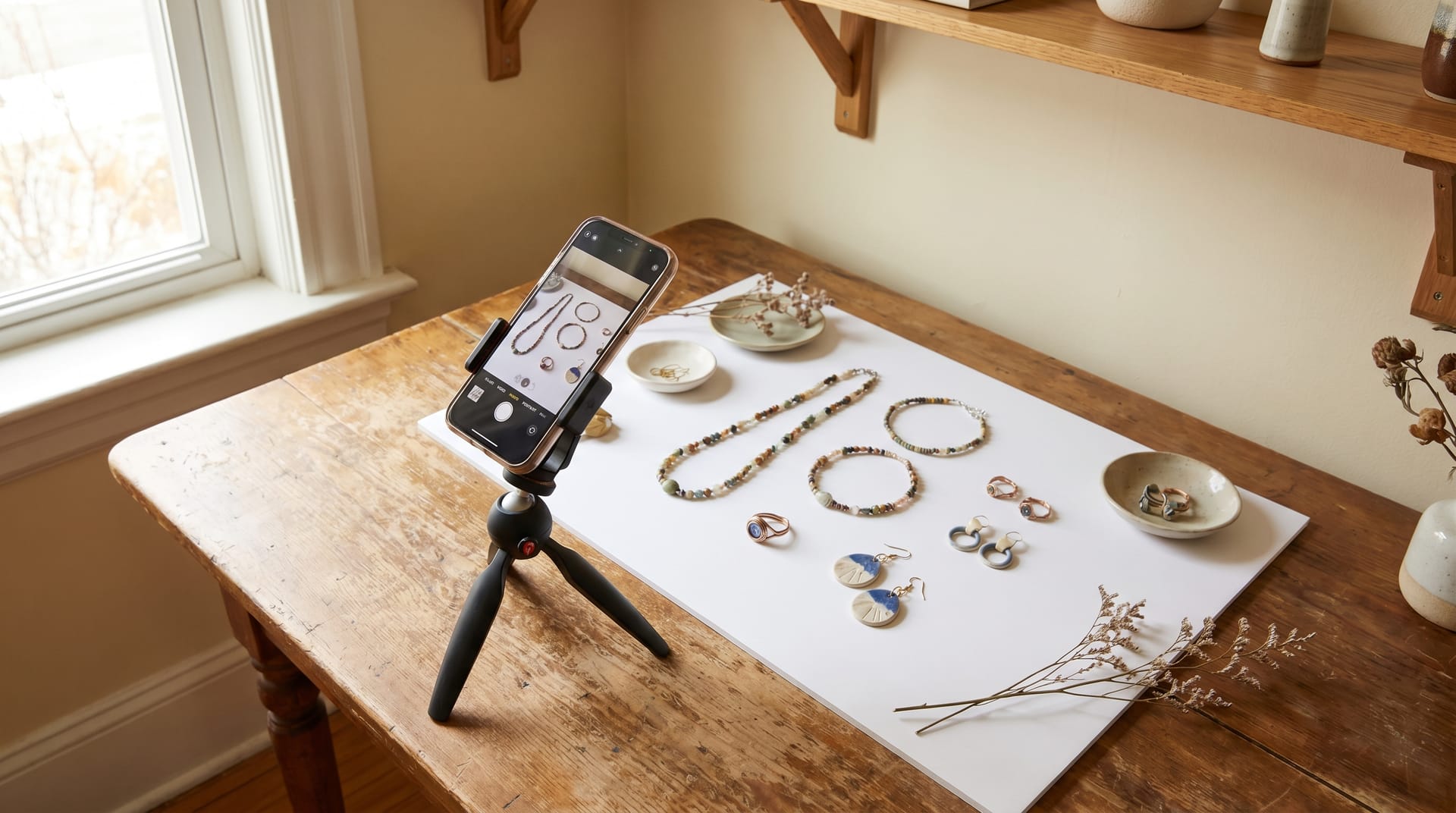
| Item | Purpose | Estimated Cost | Alternative |
|---|---|---|---|
| Foldable Lightbox (24") | Diffused lighting environment | $30 - $50 | White poster board + tape |
| LED Panel Lights (2-pack) | Consistent, adjustable lighting | $40 - $60 | Desk lamps with daylight bulbs |
| Tripod (Phone Compatible) | Camera stability for sharp images | $15 - $25 | Stack of books + rubber bands |
| White Foam Boards (2-3) | Reflectors and bounce cards | $10 - $15 | White printer paper or bedsheets |
| Seamless Backdrop Paper | Clean, infinite background | $15 - $20 | Large sheet of white paper |
| TOTAL | --- | $110 - $170 | $0 - $20 |
Lighting Tips That Make or Break Your Photos
Lighting is the single most important factor in product photography. Even a $3,000 camera cannot compensate for poor lighting, while a smartphone with excellent lighting can produce stunning results.
1. Use Soft, Diffused Light: Harsh direct light creates sharp shadows and blown-out highlights. Diffuse your light sources using a lightbox, white fabric, or parchment paper. The goal is even illumination that wraps around your product.
2. Follow the Two-Light Rule: Position one light at a 45-degree angle to the left of your product (the “key light”) and a second, dimmer light or reflector on the right (the “fill light”). This creates gentle dimension without harsh shadows.
3. Avoid Mixed Color Temperatures: Never combine daylight (5600K) with tungsten bulbs (3200K) in the same shot. Mixed lighting creates color casts that are difficult to correct. Use daylight-balanced LED panels for consistency.
4. Watch for Reflections: Shiny products like jewelry, glass, and electronics are notorious for reflecting light sources and your camera. Use a polarizing filter if available, or carefully angle your lights to minimize hot spots.
5. Shoot During Golden Hour for Lifestyle Shots: If photographing products in real-world settings, the hour after sunrise and before sunset provides warm, flattering natural light that elevates any product.
Smartphone Photography Techniques
Modern smartphones have cameras that surpass professional DSLRs from just a decade ago. With the right techniques, your phone can produce e-commerce-ready images.
Optimal Camera Settings
| Setting | Recommended Value | Why It Matters |
|---|---|---|
| Resolution | Highest available (typically 12MP+) | Ensures detail for zoom and cropping |
| File Format | HEIF/RAW if available; JPEG otherwise | RAW preserves editing flexibility |
| Grid Lines | Enabled (3x3) | Aids composition and alignment |
| Focus | Tap to focus on product | Ensures sharp subject, soft background |
| Exposure | Swipe to adjust; slightly underexpose | Prevents blown highlights |
| Timer | 3-second delay | Eliminates camera shake from tapping |
Composition Rules Every Seller Should Know
The Rule of Thirds: Place your product at the intersection of grid lines rather than dead center. This creates visual interest and follows how the human eye naturally scans an image. Most e-commerce platforms crop thumbnails from the center, so ensure your product remains visible even when cropped.
Negative Space: Do not fill the entire frame with your product. Leave 10-20% breathing room around the edges. This makes the product feel premium and gives platforms room for overlays like “Sale” badges.
Leading Lines: Use natural lines in your setup to draw the viewer’s eye toward the product. This works particularly well for flat-lay photography of accessories, stationery, and food products.
Consistent Angles: For multi-product shops, maintain the same camera angle across your catalog. If your first product is shot at a 30-degree angle, keep all subsequent products at that same angle. Consistency builds brand trust.
The Hero Shot + Detail Shots Formula: Every product listing should include:
- 1 hero shot (product on white or clean background)
- 2-3 lifestyle shots (product in use or in context)
- 1-2 detail shots (texture, features, scale reference)
- 1 scale shot (product next to a common object for size reference)
AI Enhancement for Small Business
Even with perfect lighting and composition, raw photos often need refinement. Traditionally, this meant hours in Photoshop or expensive retouching services. Today, AI-powered tools like NeoSpark put professional-grade image enhancement within reach of every small business owner.
What NeoSpark Can Do for Your Product Photos
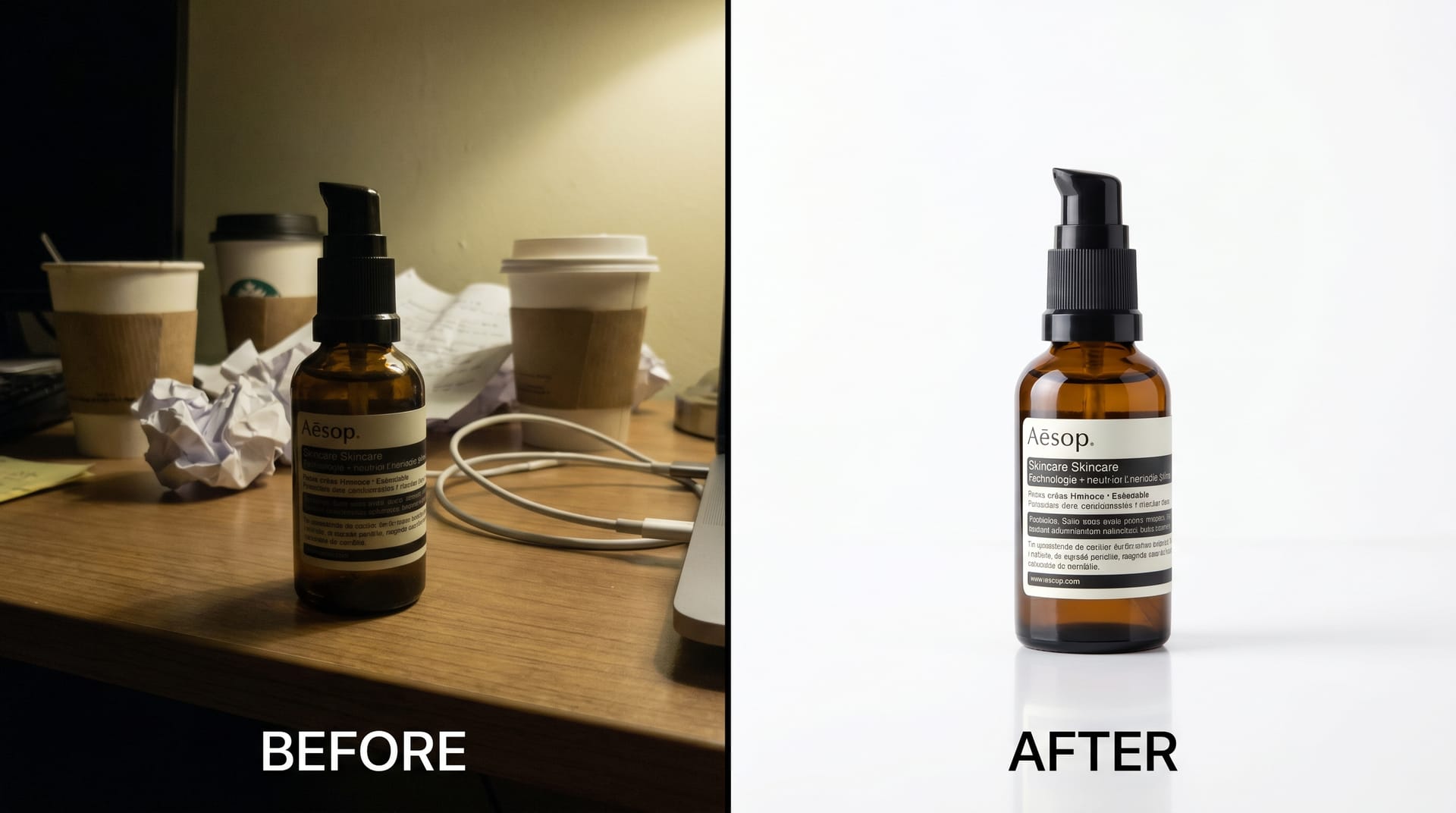
1. Instant Background Removal: NeoSpark’s AI can isolate your product from any background in seconds, producing a clean cutout ready for Amazon, eBay, or your own storefront. No green screen required. No manual tracing. The AI handles complex edges like hair, fur, and transparent objects with remarkable accuracy.
2. Lifestyle Mockup Generation: Instead of renting locations or staging elaborate sets, upload your product to NeoSpark and generate realistic lifestyle scenes. Place your coffee mug on a sunlit marble countertop. Show your skincare bottle on a spa-worthy vanity. Display your jewelry on a model’s wrist. The AI generates context that sells, without the production costs.
3. Platform-Optimized Resizing: Each e-commerce platform has specific image dimension requirements. NeoSpark automatically resizes and crops your images for Amazon (2000x2000px), Etsy (3000x2250px), Shopify (2048x2048px), and Instagram (1080x1080px), ensuring your products look sharp everywhere.
4. Batch Processing: Upload your entire catalog and apply consistent edits across hundreds of images. Change all backgrounds to pure white, apply the same shadow style, or resize everything for a seasonal sale. What once took days now takes minutes.
5. Color Correction and Enhancement: AI automatically adjusts white balance, contrast, and saturation to ensure your product colors are accurate and appealing. This is especially critical for fashion and home decor sellers, where color mismatch is a leading cause of returns.
The NeoSpark Workflow for Small Businesses
- Capture: Shoot your products with your smartphone and DIY setup
- Upload: Drag and drop images into NeoSpark
- Enhance: Remove backgrounds, generate lifestyle contexts, or apply batch edits
- Export: Download platform-optimized files ready for listing
- List: Publish to Amazon, Etsy, Shopify, or social media
This workflow transforms a process that traditionally required a photographer, a designer, and a retoucher into a task any business owner can complete in under an hour.
Platform-Specific Tips
Each sales channel has unique requirements and audience expectations. Tailoring your product photography to the platform maximizes visibility and conversion.
| Platform | Image Specs | Best Practices | Common Mistakes |
|---|---|---|---|
| Amazon | 2000x2000px, pure white background (#FFFFFF), JPEG | Fill 85% of frame; show product in use in secondary images; include infographics | Text on main image; colored backgrounds; low resolution |
| Etsy | 2000x1500px minimum, flexible backgrounds | Lifestyle and styled shots perform best; show handmade process; use all 10 image slots | Blurry thumbnails; inconsistent sizing; no scale reference |
| Shopify | 2048x2048px, square or portrait recommended | Consistent aspect ratio across store; zoom-enabled high-res images; lifestyle galleries | Mixed orientations; compressed images; no alt text |
| 1080x1080px (square) or 1080x1350px (portrait) | High visual impact; carousel posts for multiple angles; Reels for product demos | Oversaturated editing; cluttered compositions; ignoring Stories format |
Amazon-Specific Deep Dive
Amazon’s search algorithm heavily weights image quality. Listings with professional main images rank higher in search results and win the Buy Box more frequently. Key requirements include:
- Pure white background (RGB 255, 255, 255)
- No watermarks, logos, or promotional text
- Product must fill at least 85% of the image
- No additional products, props, or accessories (unless included in the sale)
- High resolution enabling zoom functionality
Use NeoSpark to ensure your Amazon images meet these strict specifications automatically.
Etsy-Specific Deep Dive
Etsy buyers are drawn to authenticity and craftsmanship. Unlike Amazon’s clinical precision, Etsy rewards personality. Consider these approaches:
- Include a “process shot” showing how the item is made
- Use natural settings that reflect your brand aesthetic
- Show the product being worn or used by real people
- Include packaging photos to communicate gift-readiness
- Add a photo with a ruler or coin for scale
Budget Comparison: DIY vs Professional vs AI-Enhanced
Small businesses must allocate limited resources wisely. Here is how three approaches compare across key dimensions.
| Factor | DIY Setup | Professional Photographer | DIY + AI Enhancement |
|---|---|---|---|
| Initial Cost | $100 - $200 | $500 - $2,000 per session | $100 - $200 + $20 - $50/month |
| Time Investment | High (learning curve) | Low (outsourced) | Medium (streamlined workflow) |
| Per-Image Cost | $0 - $2 | $25 - $150 | $0.50 - $3 |
| Turnaround Time | Immediate | 1-2 weeks | Minutes to hours |
| Scalability | Limited by your time | Expensive at scale | Unlimited batch processing |
| Quality Ceiling | Moderate | Very High | High |
| Best For | Bootstrapped startups, hobby sellers | Luxury brands, lookbooks, campaigns | Growing businesses, high-volume sellers |
For most small businesses, the DIY + AI Enhancement approach offers the optimal balance of cost, quality, and speed. You retain control over the creative process while leveraging AI to achieve professional polish that would otherwise require expensive software expertise.
Case Studies
Case Study 1: Willow & Clay Ceramics (Etsy Seller)
Background: Sarah Chen runs Willow & Clay, a handmade ceramics shop on Etsy with 47 products. For her first year, she photographed items on her kitchen counter with her iPhone 11. Sales were steady but growth had plateaued.
Challenge: Sarah’s photos were inconsistent --- some had yellow kitchen lighting, others had distracting backgrounds. Her conversion rate hovered at 1.1%, well below the Etsy average of 1.8%. She could not afford the $1,200 quote from a local product photographer for her full catalog.
Solution: Sarah invested $85 in a foldable lightbox and two LED panels. She reshot her entire catalog over a weekend using her iPhone. Then she uploaded the images to NeoSpark, removed the backgrounds, and generated clean white-background product shots plus lifestyle mockups showing her mugs on minimalist kitchen counters.
Results (3 months post-implementation):
- Conversion rate increased from 1.1% to 2.3% (+109%)
- Average order value rose from $34 to $48 (+41%) due to improved cross-selling
- Return rate dropped from 8% to 3% (-63%)
- Featured in two Etsy editorial collections, driving 4,200 additional views
Key Takeaway: “I was skeptical that better photos would matter this much,” Sarah reported. “The combination of consistent lighting and AI-generated backgrounds made my shop look like a brand, not a hobby. NeoSpark paid for itself in the first week.”
Case Study 2: GearVault Outdoor Equipment (Shopify Store)
Background: Marcus Johnson launched GearVault, a Shopify store selling compact camping gear to urban millennials. He started with manufacturer-provided images but noticed competitors using the exact same photos.
Challenge: Generic manufacturer images meant GearVault had no visual differentiation. The photos were low resolution and failed to show the products’ true scale and features. Bounce rate on product pages was 68%, and cart abandonment reached 76%.
Solution: Marcus purchased the products he wanted to feature and built a DIY photo station in his apartment. Using a smartphone tripod, natural window light, and white foam boards, he captured hero shots and detail images. He then used NeoSpark to:
- Remove apartment backgrounds and replace them with outdoor lifestyle contexts
- Generate scale comparisons showing products next to common items (water bottles, smartphones)
- Create platform-specific crops for Instagram ads and Shopify listings
- Batch-process 200+ images for a seasonal catalog launch
Results (6 months post-implementation):
- Product page bounce rate decreased from 68% to 41% (-40%)
- Cart abandonment dropped from 76% to 59% (-22%)
- Return on ad spend (ROAS) for Instagram campaigns improved from 2.1x to 4.7x
- Monthly revenue grew from $8,400 to $31,200 (+271%)
Key Takeaway: Marcus noted, “Manufacturer photos made us invisible. Once we had our own visual identity with lifestyle contexts that resonated with our audience, everything changed. The AI lifestyle mockups were a game-changer --- we could show our tent on a mountain ridge without ever leaving the city.”
FAQ
1. Can I really take professional product photos with just my smartphone?
Yes. Modern smartphones like the iPhone 15 Pro and Samsung Galaxy S24 Ultra have cameras capable of producing images suitable for major e-commerce platforms. The key factors are lighting, stability (use a tripod), and composition. A $150 DIY lighting setup with a smartphone will outperform a $3,000 camera in poor lighting every time.
2. What is the best background color for product photography?
For Amazon and most e-commerce platforms, pure white (#FFFFFF) is required for main images and performs best for search visibility. For Etsy and lifestyle-focused brands, neutral backgrounds like light gray, beige, or soft pastels can create warmth while keeping the product as the focal point. Always check your platform’s specific requirements.
3. How many photos should I include per product listing?
Include the maximum number allowed by the platform. For Amazon, use all 9 image slots. For Etsy, use all 10. For Shopify, aim for 5-8 high-quality images minimum. Your gallery should tell a complete visual story: what the product is, how it is used, key features, scale, and packaging.
4. Do I need to hire a professional photographer?
Not necessarily. Professional photographers deliver exceptional results but at significant cost ($500-$2,000+ per session). For most small businesses, a DIY setup combined with AI enhancement tools like NeoSpark achieves 85-90% of professional quality at 10% of the cost. Reserve professional shoots for major campaigns, lookbooks, or hero brand imagery.
5. How does NeoSpark’s AI background removal compare to manual editing in Photoshop?
NeoSpark’s AI processes images in seconds with accuracy that rivals or exceeds manual editing for most products. Complex cases like flyaway hair, transparent glass, or intricate jewelry chains may require minor touch-ups, but the time savings are dramatic. What takes 30 minutes in Photoshop takes under 10 seconds in NeoSpark.
6. What file size and format should I use for e-commerce images?
Use JPEG for product photos (best compression for photographic images) and PNG only when transparency is required. File size should be under 5MB for fast loading, but resolution should be at least 2000px on the longest side to enable zoom functionality. Tools like TinyPNG can further compress images without visible quality loss.
7. How often should I update my product photography?
Refresh your product images at least annually, or whenever you notice declining conversion rates. Seasonal updates (holiday-themed lifestyle shots, summer contexts) can boost engagement during peak shopping periods. Additionally, update photos whenever you change packaging, product design, or branding.
Conclusion
Product photography is the single highest-ROI investment most small businesses can make in their e-commerce operation. Better images drive more clicks, higher conversions, fewer returns, and stronger brand perception. The barriers to entry have never been lower: a modest DIY setup, smartphone camera techniques, and AI enhancement tools like NeoSpark put professional-quality imagery within reach of every seller.
6 Key Takeaways
-
Lighting is everything. A $150 DIY lighting setup will produce better results than expensive gear in poor light. Invest in soft, diffused, consistent illumination before anything else.
-
Smartphones are sufficient. Modern phone cameras are more than capable of e-commerce photography. Focus on stability (tripod), focus (tap to focus), and exposure rather than upgrading your device.
-
Platform requirements vary. Amazon demands pure white backgrounds. Etsy rewards lifestyle authenticity. Shopify needs consistency. Tailor your images to each channel’s specifications and audience expectations.
-
AI is a force multiplier. Tools like NeoSpark eliminate the traditional bottlenecks of background removal, lifestyle mockup creation, and platform optimization. What once required design expertise now takes minutes.
-
More images sell more products. Use every available image slot. Show the product from multiple angles, in context, and at scale. Each additional image answers a potential buyer’s unspoken question.
-
Measure and iterate. Track your conversion rates, return rates, and time on page before and after updating your photography. The data will confirm what your eyes already know: better images build better businesses.
Related Resources
- NeoSpark AI Background Removal Tool --- Remove backgrounds from product photos in seconds
- NeoSpark Lifestyle Mockup Generator --- Place your products in realistic scenes without a photoshoot
- NeoSpark Platform Optimizer --- Automatically resize images for Amazon, Etsy, Shopify, and social media
- E-Commerce Image Best Practices Guide --- Deep dive into image specs for every major platform
- AI for Small Business: 2026 Toolkit --- Comprehensive guide to AI tools that save time and money
- NeoSpark Pricing Plans --- Find the right plan for your business size and image volume
Ready to transform your product photography? Start your free trial of NeoSpark today and process your first 50 images at no cost. Join over 40,000 small businesses already using AI to create professional product imagery that sells.