🎬 Seedance 2.0 Global API is now live
No real-person verification required No queues - instant generation Welcome to try it now → No real-person verification required No queues - instant generation Welcome to try it now →

Prompt Lib

Curated AI prompts for stunning image and video generation. Updated daily from top creators.

Auto-curated from X

Filter by Type:

Scientific field researcher's documentation board prompt - 1
image
Nano Banana
Mar 1, 2026 X

Scientific field researcher's documentation board prompt

A detailed prompt for generating a multi-section documentation board, mimicking a field researcher's study. It requires a scientific illustration, an ecological context map, and a photograph of the subject in its natural habitat, blending clinical, cartographic, and National Geographic styles.

Prompt Preview

A field researcher's documentation board for {argument name="animal or plant" default="[ANIMAL / PLANT / ORGANISM]"} — {argument name="scientific name" default="[SCIENTIFIC NAME / HABITAT]"}. Left section: scientific illustration showing anatomical details, life-cycle stages, or seasonal variation, with measurement scales and taxonomic classification. Center section: ecological context map showing range, habitat preferences, predator-prey relationships, and conservation status indicators. Right section: the subject in its natural habitat, captured in a decisive moment, behavior visible, environment authentic, the data made alive. Visual style transitions from specimen-drawer clinical through cartographic neutrals to National Geographic field photography. Title block reading "{argument name="common name" default="[COMMON NAME]"} — [SCIENTIFIC NAME], [CONSERVATION STATUS], FIELD STUDY [YEAR]".

Scientific Macro Documentary Photography Prompt for Water Droplet on Leaf - 1
image
Nano Banana
Mar 1, 2026 X

Scientific Macro Documentary Photography Prompt for Water Droplet on Leaf

A detailed JSON-formatted prompt designed for generating ultra-photorealistic scientific macro documentary photography. It specifies extreme realism, natural optics, and focuses on a single crystal-clear water droplet resting on a broad tropical rainforest leaf, detailing the environment, lighting, and camera settings for a highly specific, non-artificial result.

Prompt Preview

{ meta": { aspect_ratio": "3:2", quality": "ultra_photorealistic", resolution": "8k", style": "scientific macro documentary photography", realism_level": "extreme realism, natural optics", ai_artifacts": "none }, subject": { description": "a single water droplet resting on a rainforest leaf", droplet": { shape": "natural spherical tension", clarity": "crystal clear", refraction": "subtle optical refraction of leaf veins inside the droplet }, leaf": { type": "{argument name="leaf type" default="broad tropical rainforest leaf"}", surface": "slightly waxy, natural micro texture", veins": "highly detailed visible leaf veins branching naturally", imperfections": [ tiny surface pores", microscopic dust", organic irregularities ] } }, environment": { location": "dense tropical rainforest", atmosphere": "humid, quiet, post-rain stillness", background": [ soft green bokeh", out-of-focus jungle foliage", natural depth layers ], air": "moist, slightly misty }, lighting": { type": "natural diffused rainforest light", source": "filtered sunlight through canopy", quality": "soft, scattered, non-directional", highlights": "gentle specular highlight on water droplet", shadows": "extremely soft micro-shadows along leaf veins }, camera": { camera_type": "professional macro photography setup", lens": "100mm macro lens", aperture": "f/8", focus": "razor-sharp focus on leaf veins and water droplet edge", depth_of_field": "very shallow, true macro depth", magnification": "1:1 macro ratio", perspective": "parallel to leaf surface }, color_grading": { palette": "deep natural greens, subtle yellow highlights", saturation": "realistic, not boosted", contrast": "low to medium, natural tonal range", clarity": "optical clarity, not digital sharpening", grain": "none or extremely subtle }, constraints": [ no insects", no fantasy glow", no artificial lighting", no cinematic color grading", no exaggerated sharpness", must look like a real scientific macro photograph ] }

Scientific Theory Visualization: 2D to 3D Extrusion - 1
image
Nano Banana
Mar 1, 2026 X

Scientific Theory Visualization: 2D to 3D Extrusion

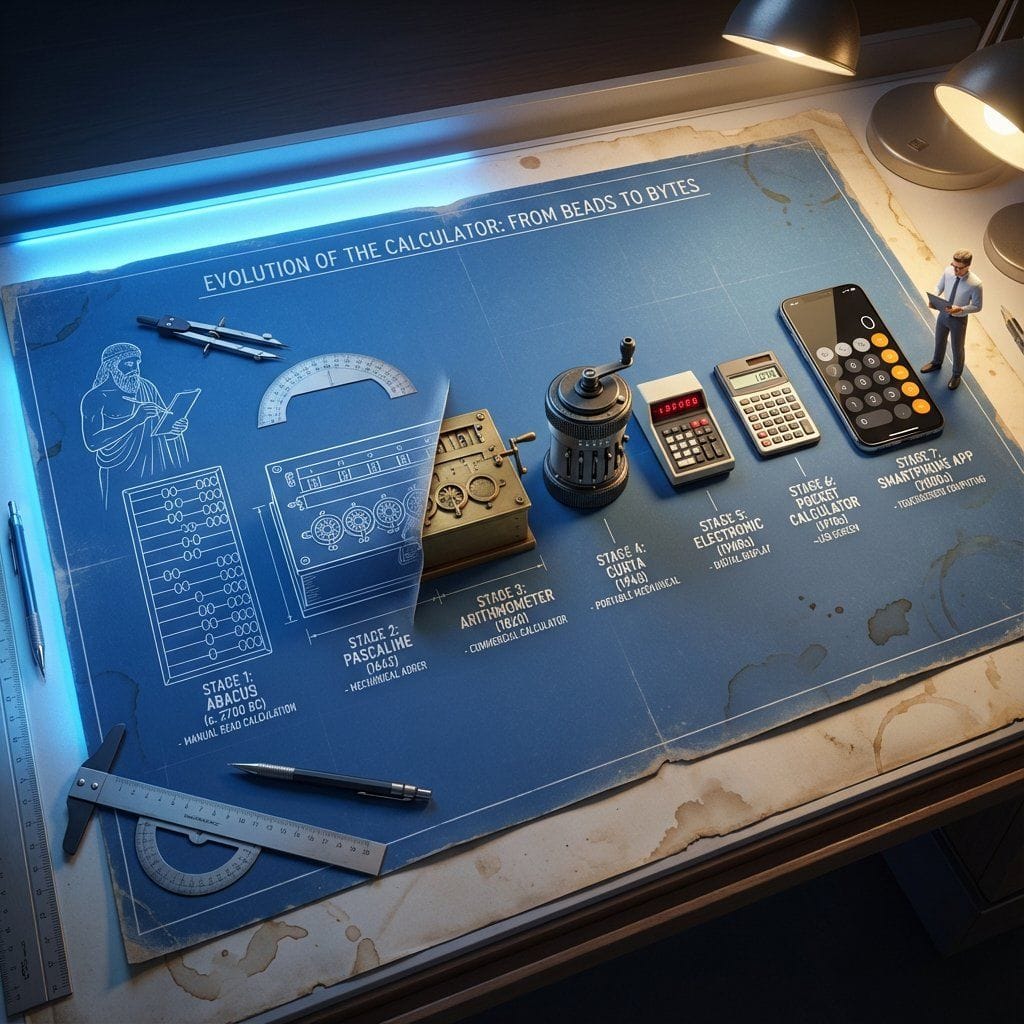
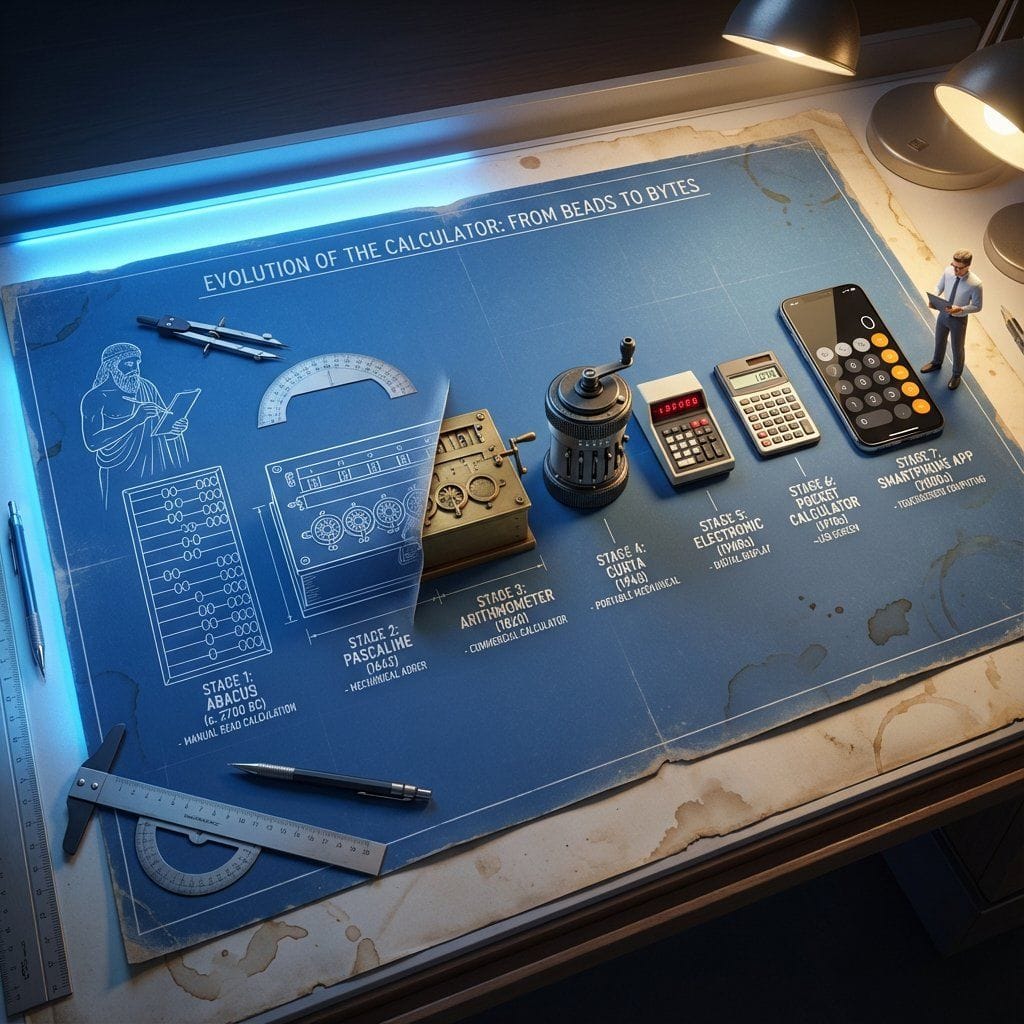
A complex, multi-phase prompt designed to visualize abstract scientific theories (like black holes) by transitioning from 2D notation (chalkboard equations) to a photorealistic, impossible 3D architectural structure. It specifies an isometric, high-angle view and includes a tiny scientist figure observing the creation.

Prompt Preview

<instructions> do this for {argument name="scientific concept" default="black holes"} Input Variable: [{argument name="formula type" default="Theorem / Formula"}] Phase 1: Schematic Decomposition Analyze the Notation: Identify the primary visual language of the scientist (Chalk on blackboard? Ink on parchment? Pencil on graph paper?). Identify the "Structure": If this theory were a building, what would it look like? Logic: Chaos Theory -> Fractal Spire. Thermodynamics -> Engine Block. Phase 2: The Dimensional Transition The Base: A flat surface covered in the [Notation Medium] (e.g., a slate blackboard covered in chalk equations). The Extrusion: The chalk lines physically lift off the surface. They begin as white wireframes, then gain opacity, then gain texture. The Climax: At the top of the image, the wireframes have fully solidified into a photorealistic, impossible structure representing the theory. The Observer: A tiny, scale-model figure of the scientist stands on the flat "2D" section, looking up in awe at the massive "3D" structure they have summoned. Output: High-Angle Isometric, "Architectural Visualization" style, stark contrast between sketchy lines and solid mass. </instructions>

Scientific Theory Visualization Generator - 1
image
Nano Banana
Mar 1, 2026 X

Scientific Theory Visualization Generator

A complex, multi-phase prompt designed to visualize abstract scientific theories or formulas (like black holes) as photorealistic, impossible architectural structures. It starts with a 2D notation medium (e.g., chalk on a blackboard) and extrudes the lines into a solid 3D structure, featuring a tiny scientist observing the creation.

Prompt Preview

<instructions> do this for {argument name="scientific concept" default="black holes"} Input Variable: {argument name="theorem or formula" default="[Theorem / Formula]"} Phase 1: Schematic Decomposition Analyze the Notation: Identify the primary visual language of the scientist (Chalk on blackboard? Ink on parchment? Pencil on graph paper?). Identify the "Structure": If this theory were a building, what would it look like? Logic: Chaos Theory -> Fractal Spire. Thermodynamics -> Engine Block. Phase 2: The Dimensional Transition The Base: A flat surface covered in the [Notation Medium] (e.g., a slate blackboard covered in chalk equations). The Extrusion: The chalk lines physically lift off the surface. They begin as white wireframes, then gain opacity, then gain texture. The Climax: At the top of the image, the wireframes have fully solidified into a photorealistic, impossible structure representing the theory. The Observer: A tiny, scale-model figure of the scientist stands on the flat "2D" section, looking up in awe at the massive "3D" structure they have summoned. Output: High-Angle Isometric, "Architectural Visualization" style, stark contrast between sketchy lines and solid mass. </instructions>

Scientific Ultra-Macro Insect Capture Prompt - 1
image
Nano Banana
Mar 1, 2026 X

Scientific Ultra-Macro Insect Capture Prompt

An extremely detailed, technical prompt designed for generating a hyper-realistic, scientific ultra-macro photograph of a predatory wasp carrying a bright green caterpillar. It specifies the goal, subject, pose, framing, and includes meticulous camera and post-processing settings (apochromatic macro lens, f/11, 1/8000 shutter, cross-polarized lighting, focus stacking) to achieve entomology documentation realism.

Prompt Preview

[GOAL] Hyper-realistic ultra-macro insect capture in mid-air [SUBJECT] predatory wasp carrying a bright green caterpillar [POSE/STATE] wings stretched mid-beat, prey gripped tightly, both suspended in motion [FRAMING] full-body insect profile, isolated; subject centered with generous negative space [LENS] apochromatic macro 100mm, 2:1 magnification [APERTURE] f/11 deep global sharpness [SHUTTER] 1/8000 freeze-motion [LIGHTING] cross-polarized dual-diffused flash; wrap-around softbox; specular-suppression; rim accent camera-right 10° [COLOR] natural crimson-amber chitin; neon-green larvae tones; neutral matte background gradient [MATERIALS] chitin texture with micro-pitting; translucent wing membranes with vein fidelity; caterpillar skin with SSS and fine ridges [FX] none; zero motion blur; no halos; no glow [DOF] deep-plane focus stacked (40+ slices) [ENV/BG] seamless monotone backdrop, soft bokeh compression, no environmental clutter [RENDER] scientific-macro discipline; entomology documentation realism [POST] deconvolution sharpening; chromatic-aberration removal; micro-contrast S-curve; artifact-free edges; grain <3% [CONSTRAINTS] AR 16:9; forbid stylization, color bleed, softness, fictional anatomy

Screen Time Digital Town Visualization Prompt - 1
image
Nano Banana
Mar 1, 2026 X

Screen Time Digital Town Visualization Prompt

A highly detailed, multi-section Chinese prompt for Nano Banana Pro that visualizes the user's screen time data as a miniature digital town (Isometric City). The prompt dictates the style (Polymer Clay/Jelly Resin), the structure (building height corresponds to usage time), the city's ecosystem (data flow, NPCs like mail carriers and like-sprites), and the final rendering specifications.

Prompt Preview

Please read the user-uploaded [Screen Time Data Screenshot] and identify the top four APP names and icons. Retrieve information and icon styles for these APPs. Based on the tone of the APP combination (Social/Entertainment/Office/Comprehensive), independently decide on the core art style. [2. Main Model Construction: Miniature Town Infrastructure] Construct a vibrant miniature digital town in the center of the screen, not just a display of buildings: Smart Base (Foundation): A stylized mobile phone base. The surface is no longer flat but topographical (depending on the style, it could be rolling circuit board hills, glass water surfaces, or Lego baseplates). Building Cluster (APP Embodiment): Skyscrapers representing the APPs. Base: A cartoon-style smartphone base with rounded, frosted metal edges, and the screen surface emits a faint breathing light. The base is surrounded by floating, materialized 3D Emojis (clouds, stars, hearts) with a translucent jelly texture. Building Cluster (APP Embodiment): Q-version skyscrapers stand on the island, representing the identified APPs. Height Rule: Building height strictly corresponds to usage duration. The APP with the longest usage time is the tallest skyscraper, occupying the visual center. Shape Rule: Extract the geometric features of the APP icons (e.g., circular icons become stacked spherical towers, square icons become rounded cube buildings). Material: A mix of high-grade Frosted Polymer Clay and Translucent Jelly Resin. The surface should have delicate fingerprint textures and diffuse reflection gloss, like an expensive blind box toy. Top Logo: The 3D logo of the App stands on the rooftop, with a texture like freshly baked, glossy candy. Floating Time Card: A frosted glass-textured 3D bubble floats directly above the Logo. The bubble encapsulates three-dimensional, softly glowing numbers (corresponding to usage duration, such as "{argument name="usage duration" default="4h 12m"}"). Buildings should not be arranged in isolation but should form neighborhoods. Tall buildings are in the center (CBD area), surrounded by potentially low-rise system application buildings (Settings, Calendar, etc.). [3. Urban Ecosystem and Interaction System (Urban Ecosystem & Interactions)] (Core Upgrade: Add “Interaction” and “Liveliness”) Please add rich dynamic details between the buildings to show how this “Digital Town” operates: Traffic and Connection (The Data Flow): Connection Method: Buildings must have physical connections. Style Adaptation: If it's cyberpunk, use glowing fiber optic elevated bridges and maglev trains; if minimalist, use transparent glass pipes; if cute, use rainbow slides. Vehicles and Transport: Pipes or roads must have flowing light points/capsules, representing data transmission. Active “Data Sprites” (The Digital Citizens): NPC Setting: Add tiny functional NPCs besides the main character figure. Message Carriers: Near social APP buildings (like WeChat), flying paper airplane drones or small postmen carrying envelopes move in and out. Like Sprites: Around video/community APP buildings (like Douyin/Xiaohongshu), glowing red hearts or thumb balloons float like fireflies. Delivery/Shopping Riders: If Meituan/Taobao is present, there should be miniature riders or package conveyor belts connected to the main building where the protagonist is located. Public Infrastructure (Public Utilities): Wi-Fi Signal Tower: A glowing signal tower (shaped like a Wi-Fi icon) stands high in the town, broadcasting energy ripples across the city. Battery Energy Station: A cylindrical energy tank (shaped like a battery icon) is located at the edge of the town, connected by thick cables to power the main building, where green liquid energy can even be seen sloshing. Notification Airship: Small airships or clouds float in the air, hanging banners with “New Message” or “Red Dot.” [4. Bottom Visual Center: Stylized 3D Nameplate] (Keep unchanged, emphasize high-end design sense) Main Title Design: “SCREEN TIME” or “{argument name="main title" default="Today's Composition"}” are designed using Inflatable Typography or Neon Tube Fonts, with materials related to the current theme. They are not printed on paper but physically “stand” in the foreground of the image. Decorative Details: Small 3D fragment elements (such as play buttons, like thumbs, battery icons) are scattered around the title, increasing the richness and trendy feel of the image. Subtitle Copy: Below the 3D title, generate a floating glowing light strip with a short, sharp comment based on user data. [5. Rendering and Photography (Tech Specs)] Composition: Axonometric overhead view, emphasizing prosperity and order. Details: Extremely rich Micro-details, making the viewer want to zoom in to see what the small figures are doing in every corner. Keywords: Octane Render, C4D, Isometric City, Micro World, Living Ecosystem, 8k Resolution.

Seed to Shelf Diorama Flowchart Prompt - 1
image
Nano Banana
Mar 1, 2026 X

Seed to Shelf Diorama Flowchart Prompt

A complex, multi-step instruction prompt for visualizing the lifecycle of a product (like coffee or a diamond ring) using a miniature photography aesthetic. It requires generating a single image featuring a 'Seed to Shelf' flowchart diorama on a vintage map, with three distinct 3D vignettes (Origin, Process, Destination) connected by a winding conveyor belt filled with the product, all rendered at HO Scale (1:87) with tilt-shift effect.

Prompt Preview

<instruction> 1. Analyze Input Variable: Input A is a Global Commodity with a distinct production lifecycle (e.g., Coffee, Chocolate/Cocoa, Wine, Denim/Cotton). Deconstruct the lifecycle into 3 Distinct Stages : Stage 1 (The Origin): The agricultural source (e.g., Coffee Plantation, Cacao Trees). Stage 2 (The Process): The industrial transformation (e.g., Roasting Plant, Fermentation Vats). Stage 3 (The Destination): The retail experience (e.g., A Hipster Cafe, A Chocolatier Shop). 2. Container (The Map Table): Goal: A "Seed to Shelf" Flowchart Diorama. The Base: A large, vintage World Map (blue oceans, pastel continents) laid flat on a wooden dining table. The Spine: A raised, winding S-Shaped Chute/Conveyor snakes through the center of the image, physically connecting the three stages. The Flow: The chute is filled with the product, which visually transforms as it moves down the path (e.g., Red Coffee Cherries at the top → → Brown Roasted Beans in the middle → → Fine Ground Powder at the bottom). 3. The Vignettes (The Stations): Construct a 3D diorama "Island" at each key point of the S-curve: Top Station (Origin): A square patch of terrain sitting on the map (e.g., South America). Detailed crops, trees, and farmers harvesting the raw material. Middle Station (Process): A compact industrial facility sitting on the map (e.g., Europe/USA). Metallic roasters, silos, smoke stacks, and factory workers. Bottom Station (Destination): An architectural Cutaway Box. The front wall is removed to reveal the interior of a shop (e.g., Espresso machines, tiny customers sitting at tables, baristas serving). 4. The Narrative Scale (The Workers): Scale: 1:87 (HO Scale) miniature figures. Action: The figures are not just standing; they are actively moving the product from the "Station" into the "Chute" (e.g., Farmers dumping baskets of cherries into the stream, Factory workers shoveling beans). 5. Lighting & Atmosphere: Camera Angle: High-Angle Perspective (45-60 degrees). Looking down the length of the table. Lighting: Natural Daylight. Bright, cheerful, and even. Shadows fall softly on the map. Depth of Field: Tilt-Shift effect. The top and bottom edges of the table are slightly blurred to make the models look tiny. Output: ONE image, Vertical Aspect Ratio (4:5), Miniature Photography, Educational Diorama aesthetic. </instruction>

Shawarma Product Photography and Exploded Infographic - 1
image
Nano Banana
Mar 1, 2026 X

Shawarma Product Photography and Exploded Infographic

A dual prompt for food visualization. The first generates a high-quality, minimalist product photo of a grilled shawarma wrap against a pure white background. The second generates a hyper-realistic exploded vertical infographic of the chicken shawarma, detailing floating layers of ingredients (mayo splash, tomatoes, chicken, pita) with clean text labels and macro photography aesthetics.

Prompt Preview

Image 1: A high-quality, professional product photograph of Shawarma wrap filled with chopped tomatoes, lettuce, chipotle mayo, donair meat (chicken). The wrap has a crisp grilled texture to it. Minimalist style, shot against a pure solid white background with soft, natural shadows. 8k resolution, sharp focus, clean aesthetic. Image 2: Create a hyper-realistic exploded vertical infographic composition of a Chicken Shawarma Wrap. At the top, a creamy chipotle mayo splash frozen mid-air with tiny droplets and a glossy texture. Below it, a vibrant layer of diced red tomatoes and fresh, crisp shredded lettuce floating gracefully. Underneath, succulent pieces of seasoned donair chicken with visible charred edges and spice texture. At the bottom, a crisp, golden-brown grilled pita wrap base with distinct grill marks. Pure white background, soft studio lighting, subtle shadows under each floating element, ultra-sharp focus, DSLR macro photography, clean infographic text labels with thin pointer lines, premium food photography aesthetic, 8K quality.

Previous Page 100 of 158 Next