Image Generation Nano Banana Nano Banana Infographic Educational
20-Panel Cartoon Robot Drawing Guide Prompt
A detailed, step-by-step prompt for Nano Banana Pro (on LeonardoAi) instructing the model to create a 20-panel layout guide for drawing a cute cartoon robot, with each panel adding one specific, cumulative change, starting from basic guidelines to final details like claw hands and shadows.

Generated result using this prompt
The Prompt
Create a 20-panel layout guide for drawing a cute cartoon robot. Each panel keeps everything from before and adds one clear change.

1. Light guide lines: vertical center, horizontal center, and a ground line.
2. Add torso: rounded rectangle above the ground.
3. Add torso centerline.
4. Add head: smaller rounded square above torso.
5. Add neck connector: short rounded block.
6. Add left eye circle.
7. Add right eye circle.
8. Add pupils inside both eyes.
9. Add thin rim rings around both eyes.
10. Add mouth rectangle below eyes.
11. Add evenly spaced vertical slats in the mouth.
12. Add left shoulder joint circle on torso side.
13. Add right shoulder joint circle.
14. Add left upper arm cylinder from left shoulder.
15. Add left elbow circle and left forearm cylinder.
16. Add left claw hand (base curve + two prongs).
17. Add right upper arm cylinder from right shoulder.
18. Add right elbow circle and right forearm cylinder.
19. Add right claw hand to match left.
20. Add legs and feet as simple blocks: two short legs from torso bottom and two rounded trapezoid feet, plus a small ground shadow.
About This Prompt
A detailed, step-by-step prompt for Nano Banana Pro (on LeonardoAi) instructing the model to create a 20-panel layout guide for drawing a cute cartoon robot, with each panel adding one specific, cumulative change, starting from basic guidelines to final details like claw hands and shadows.
Prompt Details
ID: 2618
Requires Reference Images: No
Sample Images
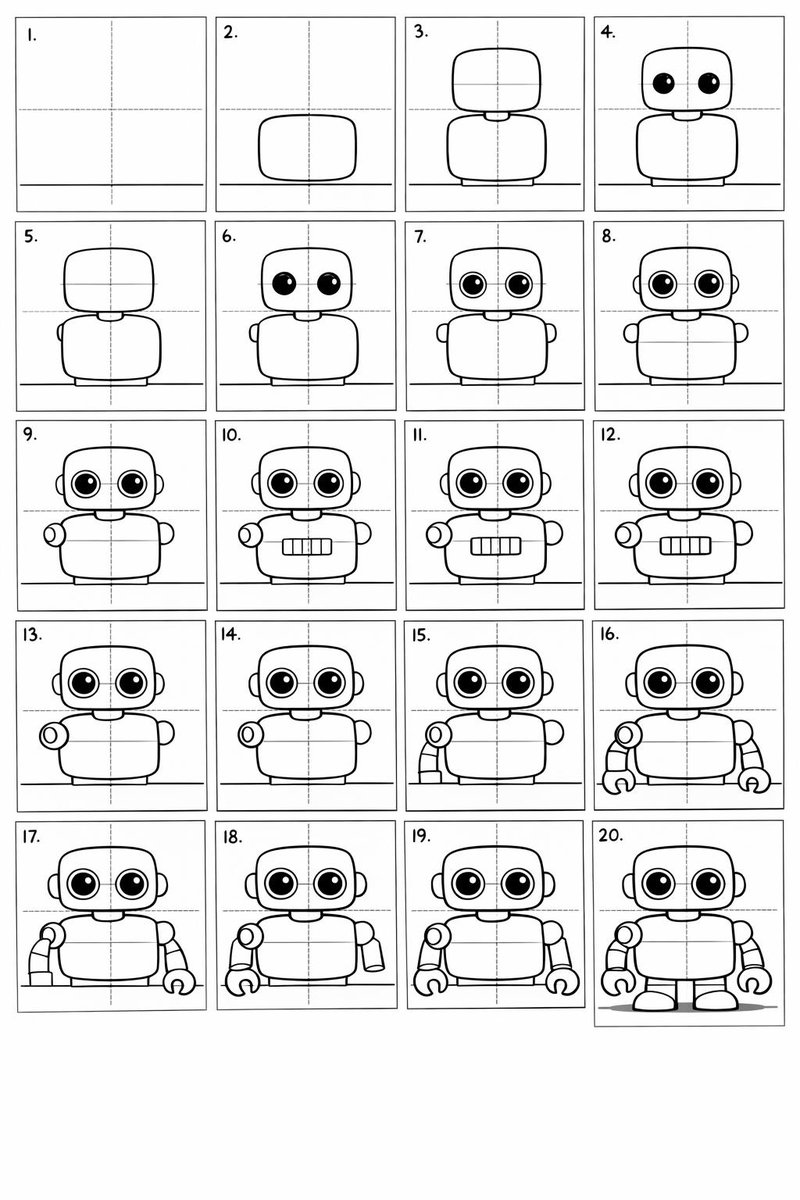
Full Prompt
Create a 20-panel layout guide for drawing a cute cartoon robot. Each panel keeps everything from before and adds one clear change.
1. Light guide lines: vertical center, horizontal center, and a ground line.
2. Add torso: rounded rectangle above the ground.
3. Add torso centerline.
4. Add head: smaller rounded square above torso.
5. Add neck connector: short rounded block.
6. Add left eye circle.
7. Add right eye circle.
8. Add pupils inside both eyes.
9. Add thin rim rings around both eyes.
10. Add mouth rectangle below eyes.
11. Add evenly spaced vertical slats in the mouth.
12. Add left shoulder joint circle on torso side.
13. Add right shoulder joint circle.
14. Add left upper arm cylinder from left shoulder.
15. Add left elbow circle and left forearm cylinder.
16. Add left claw hand (base curve + two prongs).
17. Add right upper arm cylinder from right shoulder.
18. Add right elbow circle and right forearm cylinder.
19. Add right claw hand to match left.
20. Add legs and feet as simple blocks: two short legs from torso bottom and two rounded trapezoid feet, plus a small ground shadow.
Share This Prompt
Prompt Info
Tags
Nano Banana Infographic Educational Visual
Daily Prompt Updates
New prompts are automatically curated daily from top AI creators on X.
Auto-curated from X