Modern Minimalist PPT/Diagram Generation Prompt
A comprehensive, structured prompt for Nano Banana Pro designed to generate professional, modern, and minimalist presentation slides or diagrams (PPT/architecture diagrams). It defines a specific visual style (Flat UI, vector, candy colors, rounded rectangles) and a strict vertical layout structure (Header, Flowchart, Feature List, Footer Box) optimized for landscape format.

Generated result using this prompt
The Prompt
1. Overall Visual Style

Style Keywords: Flat UI, Vector, Modern Minimalist, Card-style design.

Lines and Shapes:

Rounded Corners Priority: All borders, background blocks, buttons, and process nodes must be rounded rectangles (Rounded Rectangles, with a large corner radius, approximately 10-15px).

Elbow Lines: Process connections use right-angle polylines (no curves), lines are simple and strong.

Color Logic (Key):

“Candy Color” Scheme: Use light backgrounds with high brightness and low saturation (such as light blue, light green, light purple), paired with darker borders of the same color family.

Border Emphasis: All graphics must have clear 2px~3px solid borders.

2. Vertical Layout Structure

Regardless of the topic, please follow the following top-down layout order, which must be contained within a large border container:

Layer 1: Main Title (Header)

Position: Centered at the top of the container.

Style: Bold black font, largest font size, darkest color.

Layer 2: Core Flowchart Area

Position: Occupies 50% of the core area of the layout.

Content: Rectangular nodes + arrow connections. If it is a loop step, please use a dashed line pointing back.

Layer 3: Feature List

Position: Below the flowchart, centered or left-aligned.

Style: Short and concise bullet points, slightly smaller font, with some white space.

Layer 4: Full-width Summary Box (Footer Box)

Position: At the very bottom of the container, filling the width horizontally.

Color Scheme: Use a contrasting color (such as purple in the example), distinct from the main color scheme above.

Function: Used to place 'Summary', 'Analogy', or 'Core Conclusion'.

Landscape size (horizontal/scenic mode) is chosen because:

Content Adaptation: Horizontal content like timelines is better displayed in a horizontal canvas to show the evolution process.

Presentation Friendly: The 3:2 horizontal ratio is very suitable for insertion into PPTs and documents, and displays well on projectors or screens.

Information Capacity: Horizontal layout can accommodate more text and icons, avoiding clutter.
About This Prompt
A comprehensive, structured prompt for Nano Banana Pro designed to generate professional, modern, and minimalist presentation slides or diagrams (PPT/architecture diagrams). It defines a specific visual style (Flat UI, vector, candy colors, rounded rectangles) and a strict vertical layout structure (Header, Flowchart, Feature List, Footer Box) optimized for landscape format.
Prompt Details
ID: 1608
Requires Reference Images: No
Sample Images

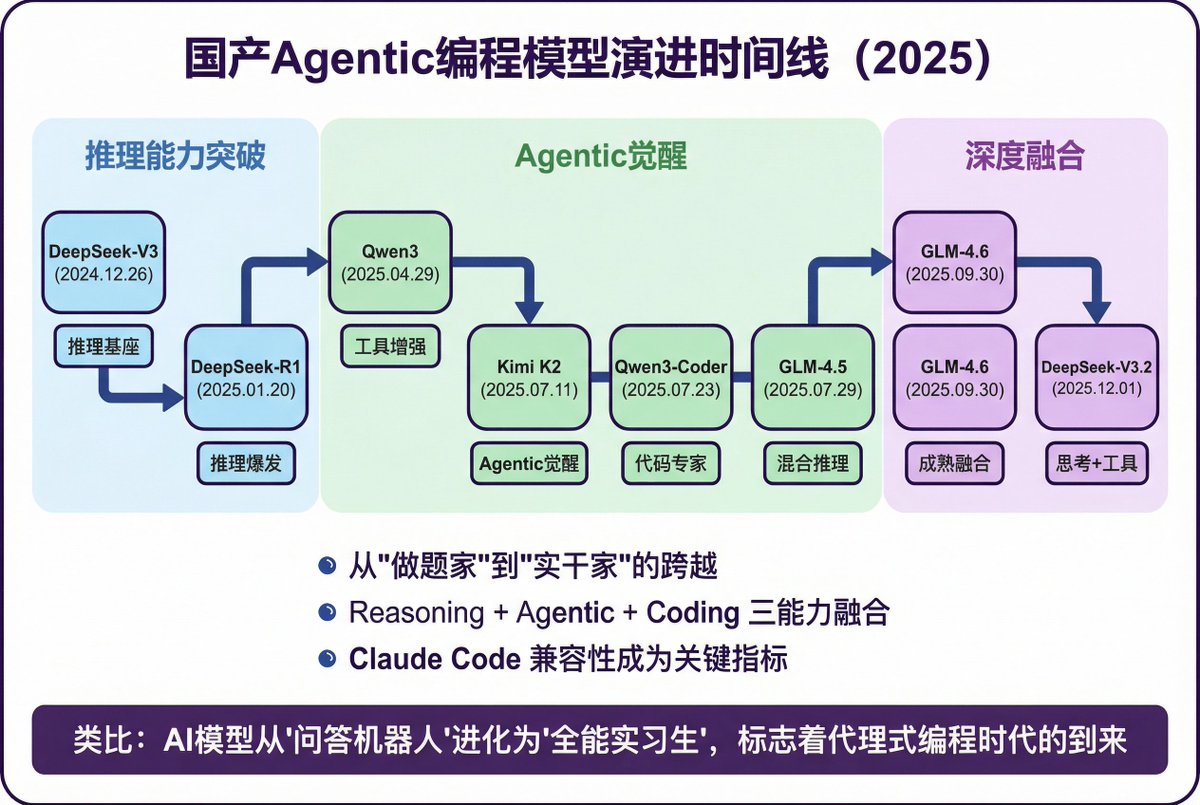
Full Prompt
1. Overall Visual Style
Style Keywords: Flat UI, Vector, Modern Minimalist, Card-style design.
Lines and Shapes:
Rounded Corners Priority: All borders, background blocks, buttons, and process nodes must be rounded rectangles (Rounded Rectangles, with a large corner radius, approximately 10-15px).
Elbow Lines: Process connections use right-angle polylines (no curves), lines are simple and strong.
Color Logic (Key):
“Candy Color” Scheme: Use light backgrounds with high brightness and low saturation (such as light blue, light green, light purple), paired with darker borders of the same color family.
Border Emphasis: All graphics must have clear 2px~3px solid borders.
2. Vertical Layout Structure
Regardless of the topic, please follow the following top-down layout order, which must be contained within a large border container:
Layer 1: Main Title (Header)
Position: Centered at the top of the container.
Style: Bold black font, largest font size, darkest color.
Layer 2: Core Flowchart Area
Position: Occupies 50% of the core area of the layout.
Content: Rectangular nodes + arrow connections. If it is a loop step, please use a dashed line pointing back.
Layer 3: Feature List
Position: Below the flowchart, centered or left-aligned.
Style: Short and concise bullet points, slightly smaller font, with some white space.
Layer 4: Full-width Summary Box (Footer Box)
Position: At the very bottom of the container, filling the width horizontally.
Color Scheme: Use a contrasting color (such as purple in the example), distinct from the main color scheme above.
Function: Used to place 'Summary', 'Analogy', or 'Core Conclusion'.
Landscape size (horizontal/scenic mode) is chosen because:
Content Adaptation: Horizontal content like timelines is better displayed in a horizontal canvas to show the evolution process.
Presentation Friendly: The 3:2 horizontal ratio is very suitable for insertion into PPTs and documents, and displays well on projectors or screens.
Information Capacity: Horizontal layout can accommodate more text and icons, avoiding clutter.
Share This Prompt
Prompt Info
Tags
Daily Prompt Updates
New prompts are automatically curated daily from top AI creators on X.